

Raspberry Pi Pico 2
RP2350 board with dual Cortex-M33 cores, the full 40-pin header, and a genuine bootrom boot path
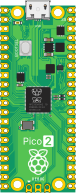
The Raspberry Pi Pico 2 carries the RP2350 — dual Cortex-M33 cores with TrustZone, 520 KB of SRAM, and 4 MB of external QSPI flash. Firmware boots through the real bootrom path, the same sequence silicon runs, rather than being dropped straight at main().
It takes an ELF or a raw .bin.
Run firmware on this board
Section titled “Run firmware on this board”Create a Pico 2 circuit with Getting Started and load a supported firmware image. Use the SDK to collect output, then adapt the assertions from the firmware CI guide to your RP2350 firmware and pins. RP2040 examples are not substitutes for RP2350 support checks.
Need a specific peripheral or behavior for your firmware? Contact us to discuss your requirements.
Datasheet
Section titled “Datasheet”The RP2350 datasheet and Pico 2 datasheet cover the register map, bootrom, and board pinout.
All 40 header positions are wirable.
| Group | Pins |
|---|---|
| GPIO | GP0–GP22, GP26–GP28 (26 total) |
| Ground | GND, GND2–GND8 — eight physically distinct pads |
| Power | VBUS, VSYS, 3V3 (out) |
| Control | 3V3_EN, RUN, ADC_VREF |
GP23, GP24, GP25 and GP29 are not on the header — on a real Pico 2 they are wired internally (SMPS mode select, VBUS sense, onboard LED, VSYS sense), so they are deliberately absent rather than silently doing nothing.
| Bus | Default pins |
|---|---|
| I2C0 | GP4 (SDA) / GP5 (SCL) — the pico-sdk default |
Onboard LED
Section titled “Onboard LED”GP25 drives the onboard LED. It isn’t a header pin, so it can’t be wired — it lights in the editor, and every transition is recorded as a state change you can read back with run.logs({ from: "pico2:onboard_led" }).
Debug output
Section titled “Debug output”UART output is captured per tap: a uart0 channel appears when firmware prints, and uart1 alongside it as soon as it’s used.